Category: portfolio

  • Case Study: Building Pilot Planner — An AI-Powered Project Management Tool for the Modern Workflow

    In the world of fast-paced development and cross-functional teams, keeping projects on track often feels like herding cats. Traditional tools offer structure but not intelligence. So we set out to change that — introducing Pilot Planner, an AI-powered project management tool designed to simplify complexity, accelerate planning, and integrate effortlessly with tools like JIRA and Confluence.

    This case study walks through how we engineered Pilot Planner to help teams plan smarter, move faster, and collaborate more effectively.


    Vision: Automate the Hardest Part of Project Management

    Our core idea was simple yet ambitious:

    “What if an AI could generate an entire project plan — timeline, tasks, assignments, documentation — from just a few inputs?”

    That’s where OpenAI’s GPT-4 comes in. By combining GPT-4’s reasoning capabilities with structured development workflows, we built a system that auto-generates 30–50+ detailed tasks, assigns them intelligently based on team skillsets, and even plans sprints and documentation in one click.


    Architecture at a Glance

    Pilot Planner is a full-stack web application, built for performance and adaptability.

    LayerTech Stack
    FrontendReact 18 + Vite + Material-UI + Zustand
    BackendNode.js + Express + MongoDB + JWT Auth
    AI EngineOpenAI GPT-4
    IntegrationsJIRA (export), Confluence-ready reports

    We chose Zustand for clean state management and Material-UI to ensure a polished, responsive UI. On the backend, Express + MongoDB give us the flexibility to scale, while JWT-based authentication secures user roles and sessions.


    What Makes Pilot Planner Different?

    AI Project Generation — Fast, Smart, Context-Aware

    Rather than manually breaking down goals into Epics, Stories, and Tasks, a Project Manager simply:

    1. Enters a project description and selects team members
    2. Clicks “Generate Plan”
    3. Watches Pilot Planner create:
      • Hierarchical task breakdown (Epics → Stories → Tasks)
      • Timeline distribution with sprint allocation
      • Role-based task assignments
      • Full executive summary + documentation

    This is project planning in minutes — not hours.


    Simplified Yet Powerful Backend

    • Robust REST API with granular role controls
    • User roles including PM, Full-Stack Dev, UX Designer, AI Dev, etc.
    • JWT-secured authentication with 7-day sessions
    • Skillset tagging system for intelligent task allocation

    All settings are configurable from the admin panel, including API key management for AI services.


    Intuitive UI with Role-Based Views

    • Project Managers see a full dashboard: project overviews, sprint timelines, Kanban board, team management
    • Team Members get a streamlined view: their own tasks, Kanban drag-and-drop, progress tracking

    Material-UI combined with week-based task filtering ensures teams stay focused on what matters now.


    Fluid Integration with JIRA & Confluence

    From the start, Pilot Planner was built with external system compatibility in mind:

    • One-click JIRA Export (CSV format, status mapping, ready-to-import)
    • Markdown project documentation for pasting into Confluence
    • Team-centric workflows mapped directly to common agile structures

    This makes it incredibly easy to bootstrap projects in Pilot Planner and then migrate into your existing JIRA pipeline.


    Key Workflows

    Project Creation

    1. PM defines project goals and team
    2. AI generates:
      • Task hierarchy
      • Sprint schedule
      • Documentation
    3. System maps tasks based on team skills

    Task Management

    • Drag & drop tasks in Kanban board
    • Week-based filtering for focused sprints
    • Real-time status updates & team sync

    Export Capabilities

    • Project Overview → Markdown Report
    • JIRA-Compatible CSV → Ready for Upload
    • Weekly Progress Reports → For team syncs and standups

    Data Structures That Scale

    Everything is structured, traceable, and export-ready:

    • Projects: Name, timeline, scope, risk, success metrics
    • Issues: Type, priority, dependencies, deliverables, sprint
    • Team Members: Role, access level, skillsets

    It’s architected to support rapid scaling — from startup teams to large enterprise projects.


    Built with Security & Simplicity in Mind

    • JWT Authentication with role-based access
    • Offline support via localStorage for uninterrupted workflow
    • Error-handled API requests and fail-safe fallbacks

    We focused on simplicity and resilience — making sure the platform stays fast, even with complex data structures.


    Results & Takeaways

    Pilot Planner is more than a project tracker — it’s an intelligent planning partner. By reducing the cognitive overhead of planning, assigning, and tracking work, it gives teams back valuable time.

    Key Benefits:

    • Reduce project planning time by 80%
    • Enable AI-driven accuracy in task allocation and estimates
    • Simplify sprint management with automated timelines
    • Keep teams focused with week-based task views
    • Seamlessly connect to JIRA and Confluence

    Final Thoughts

    In an era of constant change, speed and intelligence are everything. Pilot Planner demonstrates what’s possible when AI meets thoughtful UX, with a focus on efficiency, integration, and simplicity.

    Whether you’re a fast-growing startup or an enterprise PMO, Pilot Planner helps your team move smarter—not just faster.
  • Introducing Asset Manager: Smarter Asset Access and Optimization for Modern Organizations

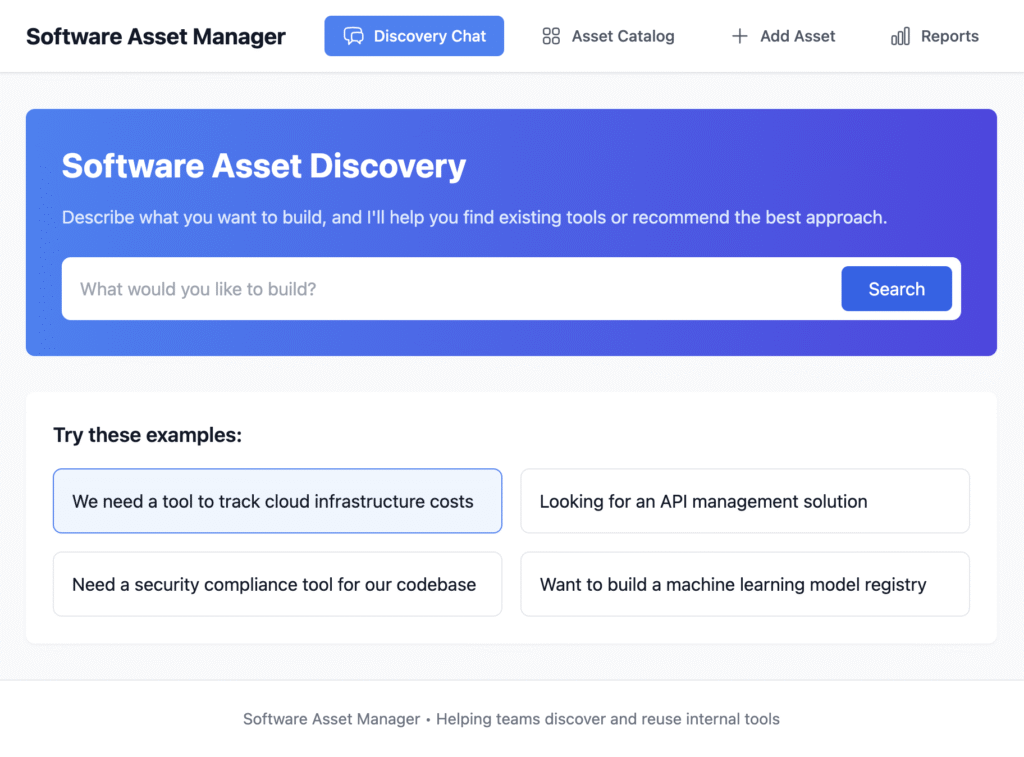
    Managing software tools, licenses, and digital assets across a large organization is no small feat. From approval bottlenecks to underused tools and bloated software spend, the challenges pile up quickly. That’s where Asset Manager comes in — a non-ordinary asset tracking and decision tool built for modern enterprises that demand clarity, efficiency, and strategic insight.

    A Three-Ladder Access Model for Everyone in the Organization

    Unlike traditional asset tracking tools, Asset Manager is designed around three distinct user levels, ensuring that everyone — from executives to interns — gets exactly what they need:

    • Top-Level Management can make informed decisions based on high-level overviews of asset usage, compliance, and cost-benefit analysis.
    • Mid-Level Managers gain control over their department’s tools, license allocations, and performance monitoring.
    • All Employees can simply search, find, and use the right tools without wasting time chasing approvals or sending multiple emails.

    This hierarchy reduces friction, accelerates productivity, and ensures compliance and cost-efficiency at scale.

    Powerful Search Interface & Deep Asset Catalog

    At the heart of Asset Manager is an intuitive search interface that acts like a smart assistant for the whole organization. Users can:

    • Search for tools by task or problem (“How do I design a wireframe?” → use Figma)
    • Explore a detailed asset catalog, where each asset has:
      • Usage guides and documentation
      • Licensing and pricing info
      • Compliance and version tracking
      • Access rights and point-of-contact

    Everything an employee or manager needs is available in one place.

    AI-Powered Recommendations and Planning

    What sets Asset Manager apart is its AI integration, which powers its advanced recommendation and planning capabilities.

    Need to solve a specific task or business problem? Ask Asset Manager, and the AI will:

    • Suggest existing tools within your organization
    • Evaluate available external solutions in the market
    • Recommend whether to buy, build, or integrate
    • Generate a basic implementation plan, including:
      • Tools required
      • Estimated cost
      • Timeline and technical effort

    The AI helps teams avoid redundant purchases, identify the best-fit tools faster, and even forecast the impact of new solutions — all without needing to consult multiple departments.

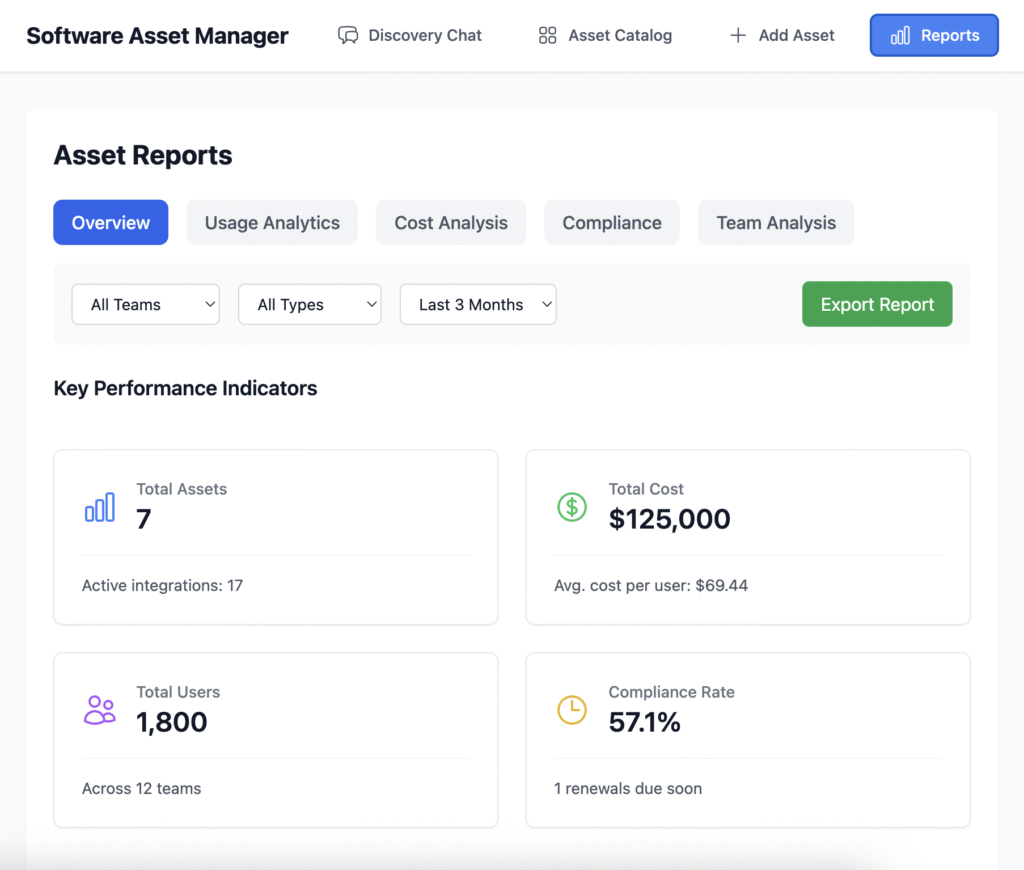
    Built-In Reporting That Prevents Waste

    Asset Manager isn’t just about finding the right tool — it’s also about knowing when not to buy or renew one. Its reporting suite uncovers:

    • Redundant tools across teams or departments
    • Overpaid licenses or underused subscriptions
    • Utilization rates that highlight what’s working and what’s not
    • Cost optimization suggestions based on real usage data

    With these insights, organizations can trim unnecessary expenses and reallocate resources where they deliver the most value.


    Final Thoughts

    Asset Manager is more than just an inventory system. It’s a productivity enabler, a budget optimizer, and a strategic decision assistant powered by AI. With its smart access model, detailed asset catalog, and intelligent recommendation engine, Asset Manager helps teams move faster, spend smarter, and innovate with confidence.

    Whether you’re streamlining internal workflows or planning your next big project, Asset Manager ensures you’ve got the right tools — and the right insights — at your fingertips.

    Updates: July 31, 2025

    What’s New in Asset Manager

    We’ve recently introduced several key enhancements to improve usability, automation, and strategic insights:

    • Task Guidance via Asset Utilization:
      The initial search functionality now includes an option to explore how to accomplish specific tasks using available assets. This empowers users to discover practical applications of their resources right from the search interface.
    • Task Automation Recommendations:
      Building on that, we’ve also introduced automated task suggestions, helping organizations identify and streamline repetitive processes directly through the Asset Manager.
    • Expanded Reporting Capabilities:
      A brand-new reporting section has been added to support deeper analysis and strategic planning. This includes reports for:
      • Redundancy
      • Return on Investment (ROI)
      • Data Backup Readiness
      • Risk Assessment
        …and more.

    These updates are designed to support organizations in making digital transformation as seamless as possible—offering smarter, more actionable insights and easier automation across the board.